12 Financial Reporting Dashboard Examples to Copy Right Now
What Every CEO Needs to Know About Financial Reporting Dashboards

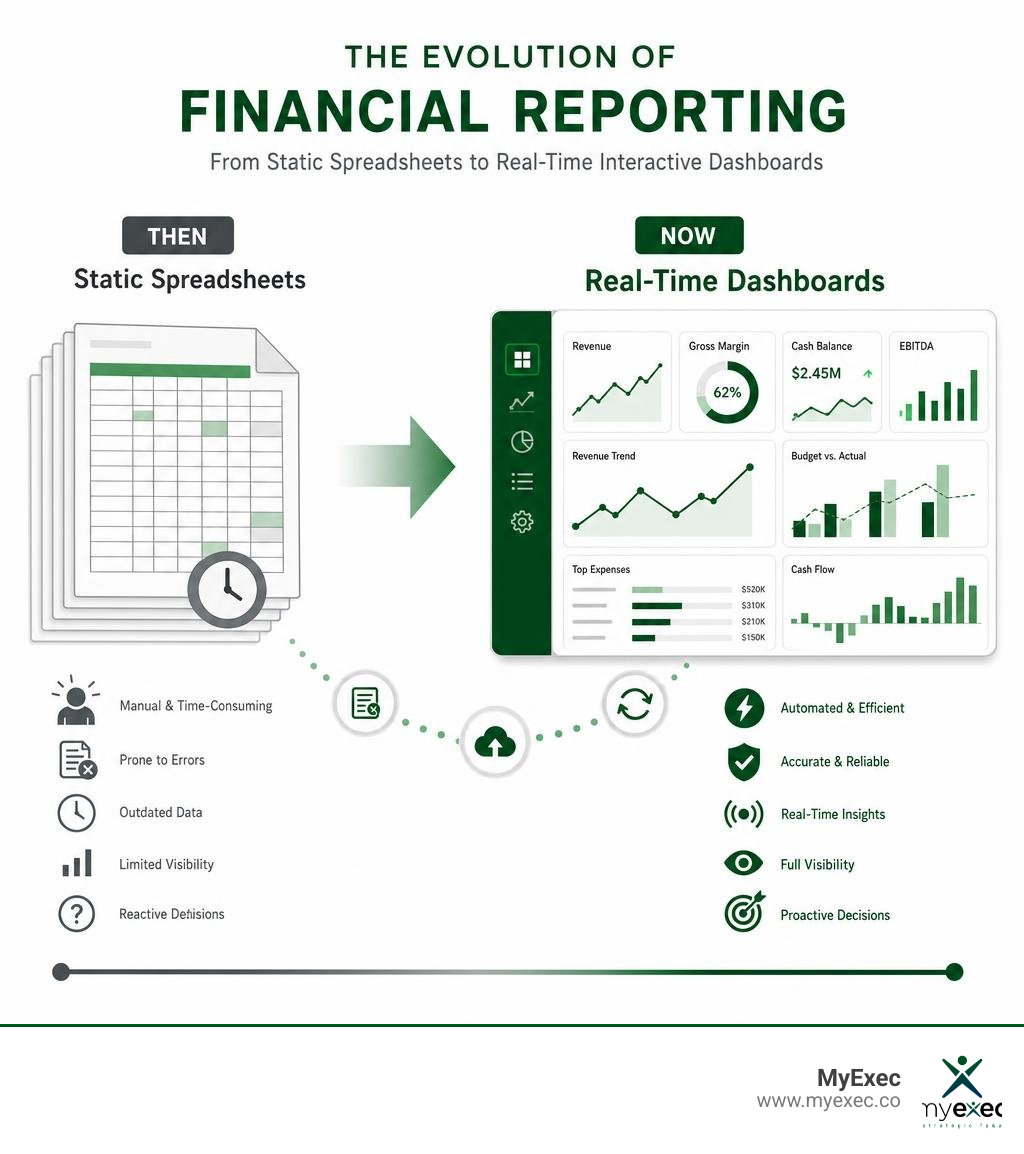
A financial reporting dashboard is a single-screen view that pulls your key financial data — revenue, expenses, cash flow, and more — into one place, updated automatically, so you always know where the business stands.
Here's what a financial reporting dashboard does at a glance:
- Replaces static spreadsheets and PDF reports with live, interactive visuals
- Tracks KPIs like cash position, gross margin, EBITDA, and budget vs. actual in real time
- Lets you drill down from a high-level number to the transaction behind it
- Supports faster forecasting, board reporting, and cash scenario analysis
- Connects data from your accounting system, ERP, and spreadsheets automatically
Most growing companies are still making big decisions off last month's numbers. By the time a spreadsheet gets built, reviewed, and shared, the data is already stale. That lag is dangerous when cash is tight, growth is accelerating, or a board meeting is two days away.
Modern financial reporting dashboards solve this. They cut reporting time by up to 70% and give leadership a real-time picture of performance — without waiting on the finance team to run another export.
The shift isn't just about speed. It's about making better decisions with information you can actually trust.
I'm Nicholas Piscani, founder of MyExec and a former Director of Finance at a $2 billion private equity-backed company, where owning budgeting, forecasting, and capital planning at scale showed me exactly how much a well-designed financial reporting dashboard changes what leadership can see and act on. In the sections below, I'll walk you through 12 real dashboard examples you can model your own reporting after.
What is a Financial Reporting Dashboard and Why Does It Matter?
At its core, a financial reporting dashboard is a dynamic business intelligence tool. Instead of waiting for the finance team to manually compile data at the end of the month, a dashboard acts as a central hub for data consolidation. It securely pulls information from your accounting platforms, billing systems, and operational databases to deliver real-time insights.
For growing businesses, this shift is revolutionary. When you can see your real-time performance instantly, you move from reactive damage control to proactive strategic steering. If you want to dive deeper into how modern systems elevate your entire organization, read our guide on how to Increase Business Value with Smarter Financial Reporting.
Traditional Reports vs. a Modern Financial Reporting Dashboard
Traditional financial reporting relies heavily on static PDFs, printed slide decks, and clunky, manual spreadsheets. These formats suffer from immense data latency—by the time you read them, the numbers are often weeks old.
In contrast, a modern financial reporting dashboard relies on interactive tables and charts. Instead of looking at a flat expense line and wondering why it’s high, you can use drill-down capabilities to click on that number and see the exact vendor transactions driving the variance. Traditional reporting shows you what happened; modern dashboards show you why it happened.
Key Benefits of Real-Time Financial Oversight
- Instant Course Correction: Real-time monitoring helps you spot cash leaks or revenue shortfalls immediately, rather than 30 days after they occur.
- Dynamic Forecasting: Instead of updating your models once a quarter, your forecasts shift automatically as new actuals flow in.
- Painless Variance Analysis: Quickly compare actual spend against your budget to hold department heads accountable.
By implementing Interactive Financial Dashboards | Farseer Platform , modern finance teams report up to 25% faster forecasting and a 30% reduction in reporting cycles, freeing up valuable time for strategic analysis.
12 Essential Financial Dashboard Examples for Modern Businesses
To build a dashboard that actually drives action, you need to design it around specific business questions and user roles. A CFO needs a completely different view of the company's financial health than an inventory manager or an options trader.
Here are 12 real-world dashboard templates and examples designed to provide executive oversight and enable data-driven decisions.

1. CFO Dashboard
The CFO dashboard is the ultimate high-level health check. It bridges operational reality with executive-level strategy. It is designed to be forward-looking and board-facing, summarizing performance for investors and executives.
- Key Metrics: Cash position, monthly burn rate, runway (in months), EBITDA, gross margin, and accounts receivable (AR) vs. accounts payable (AP) aging.
- When to Use: Monthly close reviews, board meetings, and investor updates to quickly generate board-ready reports.
2. Cash Flow Valuation Dashboard
Cash is the lifeblood of any growing business. This dashboard focuses entirely on liquidity, tracking where your money is coming from and where it is going.
- Key Metrics: Cash inflows, cash outflows, net cash flow, quick ratio, and operating cash flow.
- When to Use: Weekly cash management meetings, especially for businesses with tight working capital cycles or rapid growth phases. To see how these tools embed directly into your core systems, check out the RUX Financial Dashboard .
3. CAGR and Portfolio Performance Dashboard
For investment-backed companies, private equity holdings, or businesses managing multiple assets, tracking growth over time is vital.
- Key Metrics: Compound annual growth rate (CAGR), assets under management (AUM), internal rate of return (IRR), and portfolio tracking by asset class.
- When to Use: Quarterly investor reporting and long-term portfolio performance evaluations.
4. Actual vs. Forecast Expense Dashboard
If you want to keep your burn rate under control, you need to know exactly where you are overspending against your plan. This dashboard highlights variances across the organization.
- Key Metrics: Budget vs. actual spend, variance percentage, department spending breakdown, and projected year-end variance.
- When to Use: Monthly budget reviews with department heads to enforce cost control.
5. Expense Detail Analysis Dashboard
While the actual vs. forecast dashboard shows you where you missed the budget, the expense detail dashboard helps you find the root cause.
- Key Metrics: Expense categorization (travel, software, contractors), spend by cost centers, and transaction-level drill-down.
- When to Use: Deep-dive audits, vendor contract renegotiations, and year-end tax prep.
6. Option Valuation and Greeks Dashboard
Used primarily by financial institutions, treasury departments, or venture-backed startups with complex equity structures, this dashboard tracks the value and risk of equity instruments.
- Key Metrics: Option pricing, delta, vega, theta, rho, and implied volatility.
- When to Use: Ongoing risk management and equity valuation adjustments.
7. Margin Analysis Dashboard
Revenue is vanity, profit is sanity. This dashboard helps you understand the profitability of your products, services, or business units to guide your pricing strategy.
- Key Metrics: Gross margin, net margin, contribution margin, and customer acquisition cost (CAC) payback period.
- When to Use: Product pricing reviews, sales strategy sessions, and margin optimization projects.
8. Risk-Adjusted Performance Dashboard
This dashboard evaluates how efficiently your business is using its capital and assets relative to the financial risks it is taking.
- Key Metrics: Return on assets (ROA), return on equity (ROE), debt-equity ratio, and interest coverage ratio.
- When to Use: Preparing for debt financing, bank covenant tracking, and capital allocation planning.
9. FX Sales Analytics Dashboard
For global companies selling across multiple countries, currency fluctuations can quietly wipe out your margins. This dashboard isolates the impact of foreign exchange.
- Key Metrics: Global sales by region, transaction volume, FX gain/loss, and constant-currency revenue growth.
- When to Use: Monthly global sales reviews and treasury risk hedging meetings.
10. Profit Simulations Dashboard
This is a planning tool that allows you to run "what-if" scenarios. It models how changes in pricing, volume, or costs will impact your bottom line.
- Key Metrics: Price elasticity curves, demand forecasting, worst-case/best-case EBITDA, and profit optimization scenarios.
- When to Use: Annual budgeting, strategic planning, and preparing for new product launches.
11. Break-Even Analysis Dashboard
Every business owner needs to know their baseline survival numbers. This dashboard shows you exactly how much you need to sell to cover your costs.
- Key Metrics: Fixed costs, variable costs, break-even point (in units and dollars), and margin of safety.
- When to Use: Evaluating capital expenditures, hiring plans, or entering new markets.
12. Sponsored Compliance and Grant Dashboard
For non-profits, research institutions, and universities, tracking grant funding is a matter of legal compliance.
- Key Metrics: Grant tracking, compliance metrics, payroll cost transfers, and unbilled revenue.
- When to Use: Monthly compliance reviews and grant audits to ensure funding is spent in strict accordance with donor rules.
Key Metrics and KPIs to Include in Your Visualizations
When designing your dashboards, avoid the temptation to track everything. Focus on a mix of strategic and operational indicators.
To get the most out of these metrics, it helps to pair them with professional planning. You can learn more about how strategic modeling shapes these metrics in our guide on The Role of a Financial Modeling Consultant in Business Strategy.
Here is a breakdown of the essential metrics you should include:
- EBITDA: Earnings before interest, taxes, depreciation, and amortization. Your core operating profitability.
- Working Capital: Current assets minus current liabilities. Measures your short-term operational liquidity.
- Current Ratio: Current assets divided by current liabilities. Assesses your ability to pay short-term obligations.
- Return on Equity (ROE): Net income divided by shareholder equity. Measures how effectively capital is being reinvested.
How to Implement Modern Financial Dashboards
Setting up a dashboard doesn't have to be a multi-month IT nightmare. A successful implementation strategy focuses on data accuracy first, followed by user adoption.

How to Build a Financial Reporting Dashboard Without Coding
You don't need a team of developers to build a custom financial reporting dashboard. Modern no-code platforms allow finance teams to build and deploy custom apps in minutes using simple drag-and-drop interfaces.
By setting up direct database connections, these tools automatically map your chart of accounts and calculate complex metrics. This allows for rapid deployment—giving you a live dashboard from raw CSV or accounting exports in under a minute.
Integrating ERP, Accounting Systems, and Spreadsheets
To get a complete picture of your performance, your dashboard must integrate data from multiple sources. Modern systems use direct API connections to pull data from your ERP, accounting software (like QuickBooks or NetSuite), billing platforms, and legacy spreadsheets.
Tools like Visualize: Dashboard and Communicate - Vivid Reports allow finance teams to build these interactive visualizations directly on top of their existing Excel workflows. This ensures you maintain a single source of truth without duplicating logic or running manual exports every month.
Security, Access Control, and Compliance Considerations
Financial data is highly sensitive. When implementing any dashboard, you must establish strict security protocols:
- Role-Based Access: A department manager should only see their own team's budget, while the CFO sees everything.
- Data Encryption: Ensure all data is encrypted both in transit and at rest.
- Audit Trails: Track who accesses the dashboard and when changes are made.
For a deeper dive into establishing secure, enterprise-grade financial workflows, review our comprehensive Strategic Finance Guide.
Frequently Asked Questions about Financial Dashboards
How do financial dashboards improve decision-making?
They replace guesswork with real-time insights and clear trend analysis. Instead of relying on gut feelings, leadership can make data-driven decisions backed by live performance metrics. To evaluate how your current financial setup stacks up, take our Strategic Finance Assessment.
What is the difference between a CFO dashboard and a controller dashboard?
A controller dashboard is operational and backward-looking, focusing on close-process status, GL integrity, journal entries, and reconciliation health. A CFO dashboard is forward-looking and board-facing, focusing on cash, runway, EBITDA, and strategic budget variances.
How often should financial dashboard data be refreshed?
It depends on the metric. Cash balances and sales volume are best served by real-time updates. However, complex calculations like P&L variances or depreciation are typically processed via batch processing during the monthly close to avoid temporary data discrepancies.
Conclusion
Building a modern financial reporting dashboard is no longer a luxury reserved for enterprise companies with massive IT budgets. In 2026, it is a baseline requirement for any growing business that wants to scale efficiently, control its burn rate, and make decisions with confidence.
At MyExec, we provide fractional CFO and FP&A services for growing businesses with $5M to $50M in revenue. We deliver senior finance leadership, strategic planning, and professional valuations at a fraction of the cost of a full-time executive hire. Our scalable, full-stack finance support gives you everything from analyst-level dashboard builds to CFO-level board presentations.
Ready to gain total clarity over your numbers? Discover how we can help you Increase Business Value with Smarter Financial Reporting, or explore more of our strategic financial resources on our Insights page.